[SOLVED] Help! Update 1.7.8 is Crashing, engine won't work!
8 posts, 2215 views, 2016-08-05 to 2016-08-06
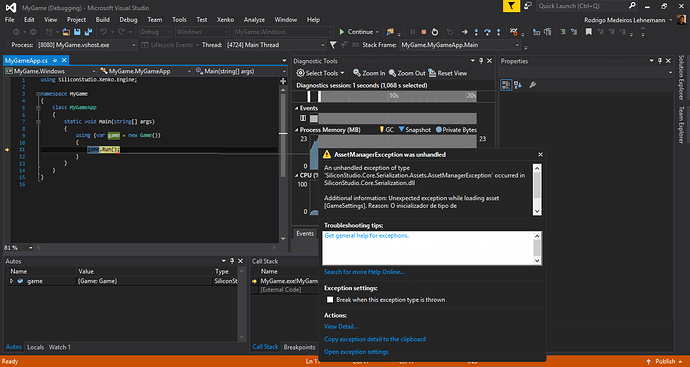
I have the same problem…Please fix it as soon as possible
Sorry for the inconvenience. We will fix it ASAP. In the meantime, you can try to reinstall manually the 1.7.7 version.
To do so , follow these instructions:
- Uninstall the faulty 1.7.8 version.
- Close the launcher if it is still open.
- Go to the GamePackages cache (should be in folder
C:\Program Files\Silicon Studio\Xenko\Cache\GamePackagesfor a standard installation). - Copy the
Xenko.1.7.7-beta.nupkgfile intoC:\Program Files\Silicon Studio\Xenko\GamePackages\Xenko.1.7.7-betaand unzip it there (it works with 7zip). - After unziping, you should remove the
_relsfolder and theXenko.nuspecand[Content_Types].xmlfiles. - Edit the file
SiliconStudio.Common.targetslocated atC:\Program Files\Silicon Studio\Xenko\Targets.- Add or modify the line
<SiliconStudioPackageXenkoVersionRevision Condition="'$(SiliconStudioPackageXenkoVersion)' == '1.7'">1.7.7-beta</SiliconStudioPackageXenkoVersionRevision>below the line for the 1.6 version. - Modify the line with
Condition="'$(SiliconStudioPackageXenkoVersionInvalid)'to also use the 1.7.7-beta version
- Add or modify the line
- You also have to fix the name of the template files in the subfolders of
C:\Program Files\Silicon Studio\Xenko\GamePackages\Xenko.1.7.7-beta\Templates\Coreby replacing %24 in their name with $. For example%24PackageNameShort%24App.cs.t4should be renamed$PackageNameShort$App.cs.t4 - Open the launcher. The 1.7.7 version should be visible and working again.
The dependencies are not found 
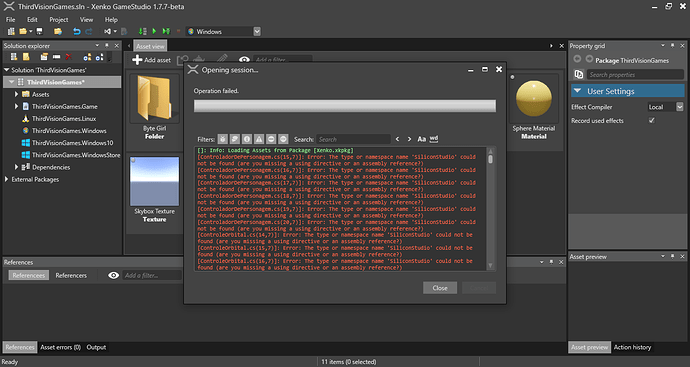
Here is content my SiliconStudio.Common.targets file:
<?xml version="1.0" encoding="utf-8"?>

<Project ToolsVersion="12.0" xmlns="http://schemas.microsoft.com/developer/msbuild/2003" InitialTargets="CheckPackages">

 <Target Name="CheckPackages">

  </Target>

</Project>
When exactly i need insert the line:
<SiliconStudioPackageXenkoVersionRevision Condition="'$(SiliconStudioPackageXenkoVersion)' == '1.7'">1.7.7-beta</SiliconStudioPackageXenkoVersionRevision>
???
I guess you never installed any Xenko version other than the 1.7.x, right? In your case, the file should be:
<?xml version="1.0" encoding="utf-8"?>
<Project ToolsVersion="12.0" xmlns="http://schemas.microsoft.com/developer/msbuild/2003" InitialTargets="CheckPackages">
  <PropertyGroup>
    <SiliconStudioPackageXenkoVersionRevision Condition="'$(SiliconStudioPackageXenkoVersion)' == '1.7'">1.7.7-beta</SiliconStudioPackageXenkoVersionRevision>
    <SiliconStudioPackageXenkoVersion>$(SiliconStudioPackageXenkoVersionRevision)</SiliconStudioPackageXenkoVersion>
    <SiliconStudioPackageXenkoVersionInvalid Condition="'$(SiliconStudioPackageXenkoVersion)' == '' or !Exists('$(MSBuildThisFileDirectory)..\GamePackages\Xenko.$(SiliconStudioPackageXenkoVersion)\Targets\Xenko.targets')">true</SiliconStudioPackageXenkoVersionInvalid>
    <SiliconStudioPackageXenkoVersion Condition="'$(SiliconStudioPackageXenkoVersionInvalid)' == 'true'">1.7.7-beta</SiliconStudioPackageXenkoVersion>
  </PropertyGroup>
  <Target Name="CheckPackages">
    <Message Condition="'$(SiliconStudioPackageXenkoVersionInvalid)' == 'true'" Text="Package Xenko with version [$(SiliconStudioPackageXenkoVersionSaved)] not found. Use version $(SiliconStudioPackageXenkoVersion) instead" />
  </Target>
  <Import Project="$(MSBuildThisFileDirectory)..\GamePackages\Xenko.$(SiliconStudioPackageXenkoVersion)\Targets\Xenko.targets" Condition="Exists('$(MSBuildThisFileDirectory)..\GamePackages\Xenko.$(SiliconStudioPackageXenkoVersion)\Targets\Xenko.targets')" />
</Project>
Thanks for the quick report. 1.7.9 should fix the issue.
There was a fix in 1.7.8 that was greatly improving performance when loading projects (both in Visual Studio and GameStudio), but we got so eager with it that it caused some problems with this release, even though all of our tests were passin)
Sorry for the inconvenience, we’ll make sure it won’t happen again!
Good thing is, 1.7.9 should be much faster to load your projects!
Thanks so much for the atention! Everthing is Works fine now.
Just out of curiosity , what are the exactly changes make into the versions 1.7.7, 1.7.8 and 1.7.9, because the release notes shows only until the versio 1.7.6
And for finish, i can make a sugestion. Why your team not create a Trello Board for bugging report? In this way, the community can send to you many buggtracking reports, and we can follow the of bugs fixing.
Work well for S2Engine HD: https://trello.com/b/IUFqihRT/s2engine-bug-tracking
Glad it’s working fine!
We already use github for bug report: https://github.com/SiliconStudio/xenko/issues
Feel free to fill one!
Release notes should be available shortly.