Error during downloading 3.0.1
7 posts, 1816 views, 2018-08-02 to 2018-08-07
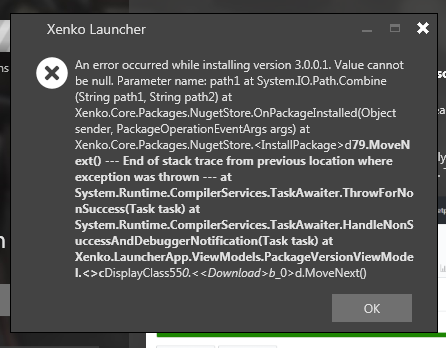
the problem of linux build is not related, when it comes to the download error, well i got this error at first personnally but after deleting and redownloading it worked properly
Linux wise i think that i heard somewhere that the linux and mac build were disabled temporarily for the MIT migration but that it would come back soon, i don’t remember where i heard it so i may be wrong but it seems to be the most logical explaination
Thanks a lot. Just unistalled and redownladed intaller. Now works like a charm ;d
I had this error too just now. I downloaded the current version from the site, which I guess is 3.0.0 and I tried to update to 3.0.1 in the launcher and got the same error message. I’m on Windows 7. To be clear, are you saying that re-installing 3.0.0 again will then let you upgrade to 3.0.1 the second time?
Edit: I just accidentally hit reinstall for the Visual Studio plugin and got an “Uninstallation Failed” message. "The extension with ID ‘…’ is not installed to any currently installed products.
Edit2: The uninstall was unsuccessful for the selected product.
I guess that’s enough Xenko for now. This thing needs some time to work out the bugs.
No, just uninstall your current version and reinstall the one from the launcher, it should work
Thanks for the fast reply. It’s not working out for me right now. I’ll try again in a few months and stick with the engine I’m using now.
If so, try to remove .nuget folder (in my case “C:\Users\shaka”) then unistall via control panel. Next re-download installer from site. Install it on desired partition and you should launch it without errors.
probably the installer was not downloaded correctly ( it happens sometimes). Luckily file isn’t big.